Categories
Uncategorized

What the European Railways and the European Payment Area have in common

This is a short piece about what I think the two entities in the title have in common. And the way I found remarkably telling is through signing up to the European Rail Passengers Union, which by the way you should absolutely consider if you are using railways in Europe at all.

First things first: I wanted to sign up to the ERPU because I think they do crucial work to improve the passenger experience on rails in Europe – which sucks right now.

The ERPU is an association under Belgian law, you can sign up online for only 12€/year, and hey, in the payment process, amongst all the usual payment options, I get “iDEAL Wero”.

Wero you say? I can try this new European payment method? Nice! I’m hooked! So, I click.

And there’s a QR code saying “scan me with your banking app”.

Well. My banking app says, this is not a Wero link – and apparently it isn’t.

So I click on the other button that says: Or use internet banking, select your bank.

All right, so I click this.

And it lists … only Belgian banks.

So, what do I do? I take the plane. I pay using Visa/Mastercard/Amexco.

This is exactly what the European Rail experience is today:

You try. You try again. The connection is shoddy, you have no rights in case ticket 1 fails and you miss your train on ticket 2. So, you use Paypal. So, you take the plane.

Here it’s the same. There’s this European payment service Wero, that in principle could be used Europe wide. But implementation on all sides – bank, service provider – is crappy. It’s limited to national borders for yet another completely in-transparent reason. And so, you pay using credit card.

And it’s probably for the exact same reasons too. Like train operators, many banks have their turf, are safe because they’re the default and somewhat state backed (yes, I’m looking at you Sparkassen) and haven’t adapted to demand in decades. Like train regulation, regulators only seem to care what’s going on when shit is on fire (cf. sub prime loan crisis et al., or railway tracks crumbling under twice the load they were constructed for et al.). And like in train land, there’s the other agile, indirectly but heavily subsidised means of payment with a shitload of hidden downsides that you default to. You don’t think cars and planes have massive downsides? Maybe you also think, Mastercard, Visa, PayPal and Apple/Google Pay offer their services for free. Heck no, you simply don’t ever see the bill. And: Yes, et al indeed.

And this is not a dunk on the folks at ERPU. On the contrary: they’ve taken what is available in terms of payment services, integrated it nicely into their web page. Jon is doing actual field work travelling around all the crazy cross border connections that barely work in Europe. No. The horror starts once you leave their web page and enter into the payment service realm.

But it illustrates so very clearly why it’s so bad. And why work like the one of ERPU is needed. Hell, maybe we need more than the European Rail Passenger Union. We need a European Payment Users Union. How’s that?
Categories
Uncategorized

The details of CAN with the STM32 toolchain

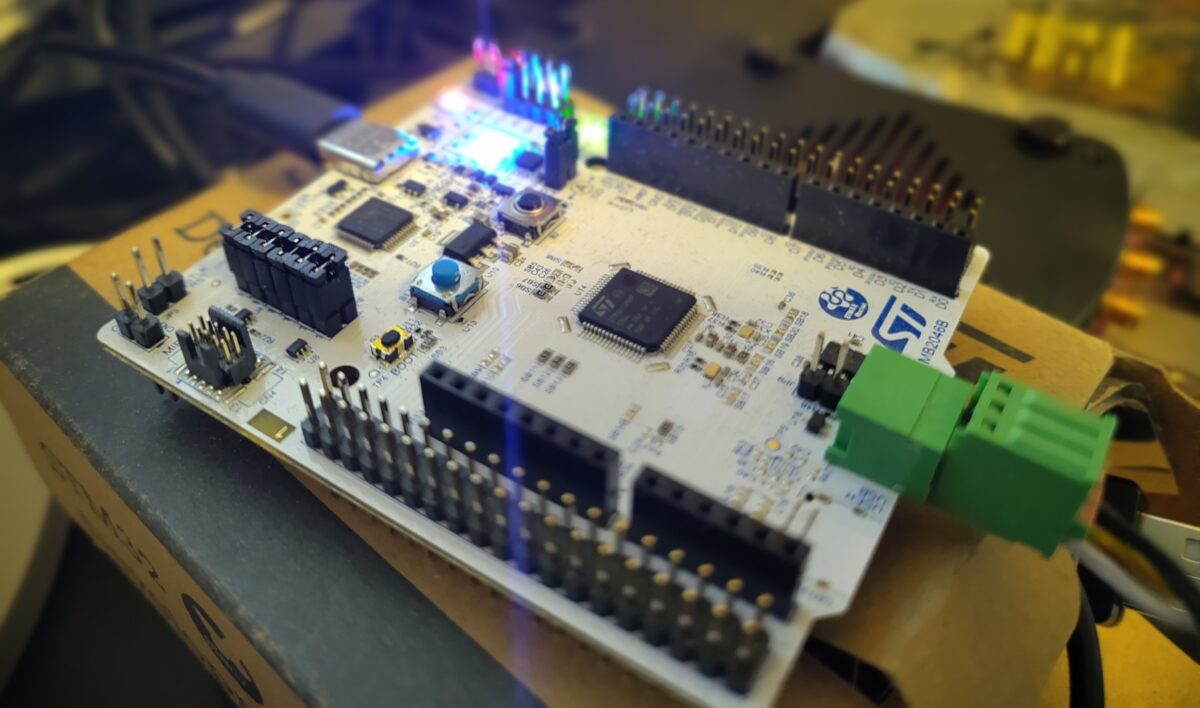
This is a blog entry about how sometimes you just get overwhelmed by UI and consequentially lost. I was looking into CAN on an STM32 dev board (the Nucleo C092RCT) when I ran into the strange issue that my little test programme would transmit CAN frames fine, but somehow not receive them.

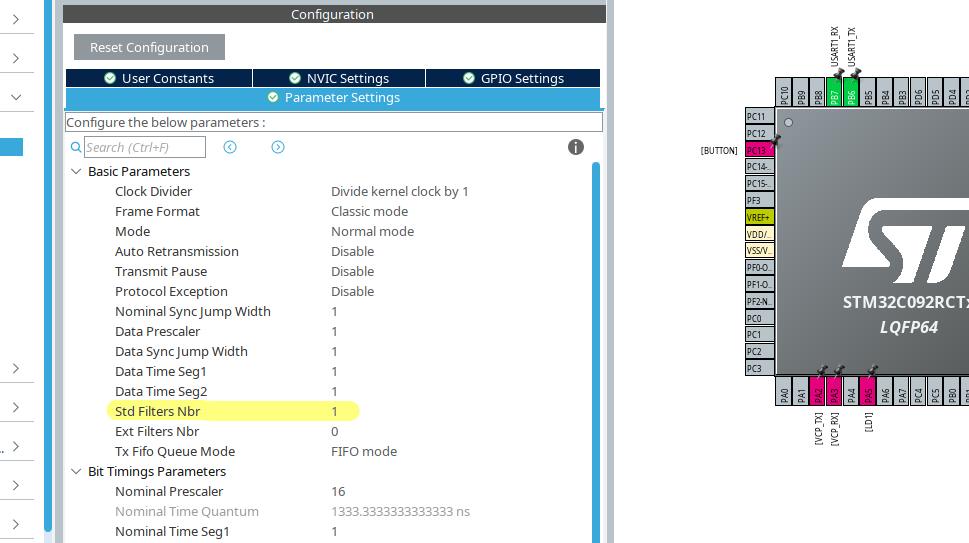
Searching forums did not return anything that solved my issue. I did find posts stating that in order for CAN to work, you’d have to set the number of filters to 1 (Std Filters Nbr).
While it is true, that you need this in order to filter by criteria like the identifier, having the filter number set to 0 simply lets everything pass and so the HAL should in theory respond to any message on the bus.

But since I wanted to filter by an ID, I set it anyway like so:

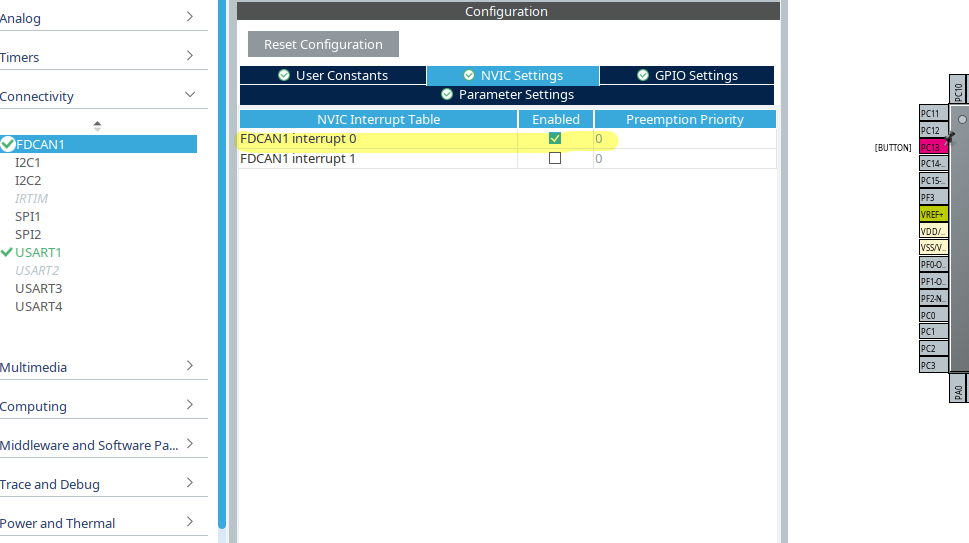
But then I though: “Let’s explore the UI of STM32CubeMX a bit more. And behold: There’s an interrupt tab called “NVIC Settings” that escaped my view before and FDCAN1 interrupt 0 is not enabled. Let’s change that like so:

And would you know it: Now sending a CAN frame with appropriate Identifier would actually cause the callback function HAL_FDCAN_RxFifo0Callback to be called and toggle my little green LED.

Some forum posts claimed you’d need to configure global filters by invoking HAL_FDCAN_ConfigGlobalFilter. And that is actually true. What got me, however, is the FilterType, where I have to admit I do not understand the behaviour of two of the three options: FDCAN_FILTER_DUAL seems pretty clear to me, it passes what matches either of the two filter IDs given by FilterID1 and FilterID2. FDCAN_FILTER_MASK however evades me. I guess it’s something like ID1 corresponding to a positive and ID2 to a negative mask (iduno). What confused me a lot was FDCAN_FILTER_RANGE which did not behave at all as I thought (my though: ID1 is the lower and ID2 the upper boundary of the range).

So here’s the snippet that actually worked for me:

static void FDCAN_Config(void) {
  FDCAN_FilterTypeDef sFilterConfig;
  // Rx Filters
  sFilterConfig.IdType = FDCAN_STANDARD_ID;
  sFilterConfig.FilterIndex = 0;
  sFilterConfig.FilterType = FDCAN_FILTER_DUAL; // other options: FDCAN_FILTER_MASK, FDCAN_FILTER_RANGE
  sFilterConfig.FilterConfig = FDCAN_FILTER_TO_RXFIFO0;
  sFilterConfig.FilterID1 = 0x400;
  sFilterConfig.FilterID2 = 0x321;
  if (HAL_FDCAN_ConfigFilter(&hfdcan1, &sFilterConfig) != HAL_OK) Error_Handler();

  if (HAL_FDCAN_ConfigGlobalFilter(&hfdcan1, FDCAN_REJECT, FDCAN_REJECT, FDCAN_REJECT_REMOTE, FDCAN_REJECT_REMOTE) != HAL_OK) Error_Handler();

  // Start Module
  if (HAL_FDCAN_Start(&hfdcan1) != HAL_OK) Error_Handler();
  if (HAL_FDCAN_ActivateNotification(&hfdcan1, FDCAN_IT_RX_FIFO0_NEW_MESSAGE, 0) != HAL_OK) Error_Handler();

  // Prepare Tx
  TxHeader.Identifier = 0x321;
  TxHeader.IdType = FDCAN_STANDARD_ID;
  TxHeader.TxFrameType = FDCAN_DATA_FRAME;
  TxHeader.DataLength = FDCAN_DLC_BYTES_4;
  TxHeader.ErrorStateIndicator = FDCAN_ESI_PASSIVE;
  TxHeader.BitRateSwitch = FDCAN_BRS_OFF;
  TxHeader.FDFormat = FDCAN_CLASSIC_CAN;
  TxHeader.TxEventFifoControl = FDCAN_NO_TX_EVENTS;
  TxHeader.MessageMarker = 0;
}

void HAL_FDCAN_RxFifo0Callback(FDCAN_HandleTypeDef *hfdcan, uint32_t RxFifo0ITs) {
  if ( (RxFifo0ITs & FDCAN_IT_RX_FIFO0_NEW_MESSAGE) != RESET) {
  if (HAL_FDCAN_GetRxMessage(hfdcan, FDCAN_RX_FIFO0, &RxHeader, RxData) != HAL_OK) Error_Handler();
    BSP_LED_Toggle(LED_GREEN);
    printf("HAL_FDCAN_RxFifo0Callback! %s\r\n", (char*) RxData);
}

I hope, this helps some. By the way: If you play with options in STM32CubeMX, double check the other options – they tend to get reset as you play with other values.

Categories
Hardware Linux

Firefox/LibreWolf taking down graphics stack on Wayland with AMD GPU

I keep having screens freezing seemingly randomly on my AMD Strix Halo GPU on Wayland whenever (and it seems only if!) I’m using Firefox/LibreWolf.

I can recover fine: Unplug the HDMI or DisplayPort cable of the affected screen, wait a few seconds and the graphics stack resets and everything is back to normal.

When this happens, I get the following module panic retrievable via dmesg:

[69348.590903] amdgpu 0000:c4:00.0: [drm] ERROR [CRTC:86:crtc-0] flip_done timed out
[69362.413939] amdgpu 0000:c4:00.0: [drm] ERROR flip_done timed out
[69362.413954] amdgpu 0000:c4:00.0: [drm] ERROR [CRTC:86:crtc-0] commit wait timed out
[69372.653095] amdgpu 0000:c4:00.0: [drm] ERROR flip_done timed out
[69372.653111] amdgpu 0000:c4:00.0: [drm] ERROR [PLANE:83:plane-7] commit wait timed out
[69843.658648] amdgpu 0000:c4:00.0: [drm] ERROR [CRTC:86:crtc-0] flip_done timed out
[69845.208181] workqueue: dm_irq_work_func [amdgpu] hogged CPU for >10000us 4 times, consider switching to WQ_UNBOUND
[69853.896845] amdgpu 0000:c4:00.0: amdgpu: [drm] ERROR [CRTC:86:crtc-0] hw_done or flip_done timed out
[69864.136149] amdgpu 0000:c4:00.0: [drm] ERROR flip_done timed out
[69864.136165] amdgpu 0000:c4:00.0: [drm] ERROR [CRTC:86:crtc-0] commit wait timed out
[69874.375292] amdgpu 0000:c4:00.0: [drm] ERROR flip_done timed out
[69874.375309] amdgpu 0000:c4:00.0: [drm] ERROR [PLANE:83:plane-7] commit wait timed out
[69874.456995] ------------[ cut here ]------------
[69874.456998] WARNING: CPU: 28 PID: 411 at drivers/gpu/drm/amd/amdgpu/../display/amdgpu_dm/amdgpu_dm.c:9074 amdgpu_dm_commit_planes+0x10c3/0x1620 [amdgpu]
[69874.457496] Modules linked in: tls snd_seq_dummy snd_hrtimer xfrm_interface xfrm6_tunnel tunnel4 tunnel6 xfrm_user xfrm_algo rpcsec_gss_krb5 twofish_generic twofish_avx_x86_64 twofish_x86_64_3way twofish_x86_64 twofish_common serpent_avx2 serpent_avx_x86_64 serpent_sse2_x86_64 serpent_generic blowfish_generic blowfish_x86_64 blowfish_common cast5_avx_x86_64 cast5_generic cast_common nft_masq des3_ede_x86_64 nfsv4 des_generic libdes camellia_generic camellia_aesni_avx2 camellia_aesni_avx_x86_64 camellia_x86_64 nft_chain_nat nf_nat xcbc nf_conntrack nf_defrag_ipv6 nf_defrag_ipv4 md4 nfs netfs bridge stp llc vxlan nf_tables ip6_udp_tunnel udp_tunnel ccm overlay qrtr rfcomm cmac algif_hash algif_skcipher af_alg bnep binfmt_misc zfs(PO) spl(O) nfsd nfs_acl sch_fq_codel lockd grace msr parport_pc ppdev lp parport joydev btusb btrtl btintel btbcm btmtk bluetooth wacom input_leds amd_atl intel_rapl_msr intel_rapl_common snd_acp70 snd_acp_i2s snd_acp_pdm snd_acp_pcm snd_sof_amd_acp70 snd_sof_amd_acp63 snd_sof_amd_vangogh
[69874.457550] snd_sof_amd_rembrandt snd_sof_amd_renoir snd_hda_codec_alc662 snd_sof_amd_acp snd_hda_codec_realtek_lib snd_sof_pci snd_hda_codec_generic snd_sof_xtensa_dsp snd_sof snd_sof_utils snd_hda_codec_atihdmi snd_pci_ps snd_hda_codec_hdmi snd_soc_acpi_amd_match snd_amd_sdw_acpi soundwire_amd soundwire_generic_allocation soundwire_bus edac_mce_amd snd_soc_sdca mt7925e snd_hda_intel mt7925_common snd_hda_codec snd_soc_core snd_usb_audio mt792x_lib snd_hda_core snd_compress mt76_connac_lib snd_intel_dspcfg ac97_bus mt76 snd_pcm_dmaengine snd_usbmidi_lib snd_intel_sdw_acpi kvm_amd snd_ump snd_hwdep snd_rpl_pci_acp6x snd_seq_midi snd_acp_pci mac80211 snd_seq_midi_event snd_amd_acpi_mach snd_acp_legacy_common kvm nls_iso8859_1 uvcvideo snd_rawmidi snd_pci_acp6x videobuf2_vmalloc snd_pcm uvc snd_seq videobuf2_memops videobuf2_v4l2 snd_seq_device irqbypass videobuf2_common snd_timer polyval_clmulni snd_pci_acp5x cfg80211 ghash_clmulni_intel videodev snd_rn_pci_acp3x snd snd_acp_config aesni_intel i2c_piix4 snd_soc_acpi
[69874.457591] mc rapl wmi_bmof libarc4 ccp amdxdna soundcore snd_pci_acp3x k10temp i2c_smbus soc_button_array amd_pmc mac_hid amdgpu amdxcp drm_panel_backlight_quirks gpu_sched drm_buddy drm_ttm_helper ttm drm_exec drm_suballoc_helper drm_display_helper auth_rpcgss cec rc_core i2c_algo_bit nvme_fabrics sunrpc efi_pstore nfnetlink dmi_sysfs ip_tables x_tables autofs4 btrfs blake2b_generic raid10 raid456 async_raid6_recov async_memcpy async_pq async_xor async_tx xor raid6_pq raid1 raid0 linear hid_generic usbhid sdhci_pci nvme sdhci_uhs2 psmouse thunderbolt nvme_core serio_raw sdhci nvme_keyring video i2c_hid_acpi cqhci nvme_auth i2c_hid wmi hid
[69874.457638] CPU: 28 UID: 0 PID: 411 Comm: kworker/28:1H Kdump: loaded Tainted: P O 6.17.0-14-generic #14-Ubuntu PREEMPT(voluntary)
[69874.457644] Tainted: [P]=PROPRIETARY_MODULE, [O]=OOT_MODULE
[69874.457645] Hardware name: AZW GTR Pro/GTR Pro, BIOS GTRP108 09/16/2025
[69874.457648] Workqueue: events_highpri dm_irq_work_func [amdgpu]
[69874.458008] RIP: 0010:amdgpu_dm_commit_planes+0x10c3/0x1620 [amdgpu]
[69874.458309] Code: e8 f2 5a ff ff 4c 8b 9d 78 ff ff ff e9 c2 f9 ff ff 31 c9 48 85 d2 0f 85 cb fe ff ff e9 bf f8 ff ff 0f 0b 0f 0b e9 f7 fe ff ff <0f> 0b e9 0f ff ff ff 48 8b 45 88 be 01 00 00 00 4c 89 9d 30 ff ff
[69874.458311] RSP: 0018:ffffd10e41b3f9e8 EFLAGS: 00010082
[69874.458315] RAX: 0000000000000001 RBX: 0000000000000246 RCX: 0000000000000000
[69874.458317] RDX: 0000000000000000 RSI: 0000000000000000 RDI: 0000000000000000
[69874.458318] RBP: ffffd10e41b3fae8 R08: 0000000000000000 R09: 0000000000000000
[69874.458319] R10: 0000000000000000 R11: 0000000000000000 R12: ffff8d5aa6f45b18
[69874.458320] R13: 0000000000000000 R14: ffff8d5aa8dcc000 R15: ffff8d5a8d682c00
[69874.458322] FS: 0000000000000000(0000) GS:ffff8d718b87f000(0000) knlGS:0000000000000000
[69874.458324] CS: 0010 DS: 0000 ES: 0000 CR0: 0000000080050033
[69874.458325] CR2: 00007ef8da7208f0 CR3: 00000015d0c40000 CR4: 0000000000f50ef0
[69874.458327] PKRU: 55555554
[69874.458329] Call Trace:
[69874.458331] [69874.458337] ? manage_dm_interrupts+0xa3/0x210 [amdgpu] [69874.458606] amdgpu_dm_atomic_commit_tail+0xa77/0x1130 [amdgpu] [69874.458862] commit_tail+0xc0/0x1b0 [69874.458868] ? drm_atomic_helper_swap_state+0x2d2/0x3a0 [69874.458872] drm_atomic_helper_commit+0x153/0x190 [69874.458874] drm_atomic_commit+0xaa/0xf0 [69874.458877] ? __pfx___drm_printfn_info+0x10/0x10 [69874.458883] dm_restore_drm_connector_state+0x102/0x170 [amdgpu] [69874.459125] handle_hpd_irq_helper+0x1a3/0x1e0 [amdgpu] [69874.459360] handle_hpd_irq+0xe/0x20 [amdgpu] [69874.459592] dm_irq_work_func+0x16/0x30 [amdgpu] [69874.459824] process_one_work+0x18b/0x370 [69874.459830] worker_thread+0x317/0x450 [69874.459833] ? _raw_spin_lock_irqsave+0xe/0x20 [69874.459839] ? __pfx_worker_thread+0x10/0x10 [69874.459842] kthread+0x108/0x220 [69874.459845] ? __pfx_kthread+0x10/0x10 [69874.459848] ret_from_fork+0x131/0x150 [69874.459853] ? __pfx_kthread+0x10/0x10 [69874.459855] ret_from_fork_asm+0x1a/0x30 [69874.459860]
[69874.459861] ---[ end trace 0000000000000000 ]---
[69874.498959] workqueue: dm_irq_work_func [amdgpu] hogged CPU for >10000us 5 times, consider switching to WQ_UNBOUND
[69874.722942] workqueue: dm_irq_work_func [amdgpu] hogged CPU for >10000us 7 times, consider switching to WQ_UNBOUND
[69874.841943] workqueue: dm_irq_work_func [amdgpu] hogged CPU for >10000us 11 times, consider switching to WQ_UNBOUND

It’s super annoying but not the end of the world. I would like to debug it, however, to find out who’s going to get the issue posted: Firefox, LibreWolf, Wayland or AMD?

Any ideas? Let me know @cweickhmann@qoto.org.

Categories
Linux Python

Massive Nextcloud log file quickly analysed using Python

I ran into a problem with quite a buggy Nextcloud instance on a host with limited quota. The Nextcloud log file would baloon at a crazy rate. So at one point, I snatched a 700 MB sample (yeah, that took maybe an hour or so) and wondered: what’s wrong?

So, first things first: Nextcloud’s log files are JSON files. Which makes them excruciatingly difficult to read. Okay, better than binary, but still, not an eye pleaser. They wouldn’t be easy to grep either. So, Python to the rescue as it has the json module*.

First, using head I looked at the first 10 lines only. Why? Because I had no idea of the performance of this little script of mine and I wanted to check it out first.

head -n 10 nextcloud.log > nextcloud.log.10

Because these logs are scattered with user and directory names and specifics of that particular Nextcloud instance (it’ll be NC from here on), I won’t share any of them here. Sorry. But if you have NC yourself, just get it from the /data/ directory of your NC instance.

I found each line to contain one JSON object (enclosed in curly brackets). So, let’s read this line-by-line and feed it into Python’s JSON parser:

import json

with open("nextcloud.log.10", "r") as fh:
    for line in fh:
        data = json.loads(line)

At this point, you can already get an idea of how long each line is processed. If you’re using Jupyter Notebook, you can place the with statement into its own cell and simply use the %%timeit cell magic for a good first impression. On my machine it says

592 µs ± 7.65 µs per loop (mean ± std. dev. of 7 runs, 1,000 loops each)

which is okay: roughly 60 µs per line.

Next, I wanted to inspect a few lines and make reading easier: pretty print, or pprint as its module is called, to the rescue!

from pprint import pprint

pprint(data)

This pretty prints the last line. If you want to access all 10 lines, create for instance an empty array data_lines first and do data_lines.append(data) inside the for loop.

{'reqId': '<redacted>',
 'level': 2,
 'time': '2025-02-06<redacted>',
 'remoteAddr': '<redacted>',
 'user': '<redacted>',
 'app': 'no app in context',
 'method': 'GET',
 'url': '/<redacted>/apps/user_status/api/<redacted>?format=json',
 'message': 'Temporary directory /www/htdocs/<redacted>/tmp/ is not present or writable',
 'userAgent': 'Mozilla/5.0 (Linux) <redacted> (Nextcloud, <redacted>)',
 'version': '<redacted>',
 'data': []}

Okay, there is a message which might be interesting, but I found another one:

{'reqId': '',
'level': 0,
'time': '2025-02-06T',
'remoteAddr': '',
'user': '',
'app': 'no app in context',
'method': 'PROPFIND',
'url': '//',
'message': 'Calling without parameters is deprecated and will throw soon.',
'userAgent': 'Mozilla/5.0 (Linux) (Nextcloud, 4)',
'version': '',
'exception': {'Exception': 'Exception',
   'Message': 'No parameters in call to ',
    …

Now, this is much more interesting: It contains a key exception with a message and a long traceback below.

I simply want to know:

  • How many of these exceptions are there?
  • How many unique messages are there?

In other words: Is this a clusterfuck, or can I get this thing silent by fixing a handful of things?

So, the idea is simple:

  1. Read each line.
  2. Check if the line contains an exception keyword.
  3. In that case, count it and…
  4. … append the corresponding message to a list.
  5. Finally, convert that list into a set.

And here is how this looks in Python:

import json
from pprint import pprint

lines = 0
exceptions = 0
ex_messages = []

with open("nextcloud.log", "r") as fh:
    for line in fh:
        lines += 1
        data = json.loads(line)
        
        if "exception" in data.keys():
            exceptions += 1
            msg = data["exception"]["Message"]
            ex_messages.append(msg)

print(f"{lines:d} read, {exceptions:d} exceptions.")

s_ex_msg = set(ex_messages)
print(f"{len(s_ex_msg):d} unique message types.")

pprint(s_ex_msg)

I had

37460 read, 32537 exceptions.
22 unique message types.

That’s a lot of exceptions but a surprisingly small number of unique messages, i.e. possible individual causes.

In my case, it mainly showed me what I knew beforehand: The database was a total mess.

But see what you find.

Exercise: See how you need to modify the script to count how many out of the 32537 exceptions correspond to each of the 22 unique messages. And toot about it.

*) I wonder if people will come and propose to use simplejson, as I’ve read in the wild, because “it’s faster!!!”. Use %%timeit to find out. Anything else is Mumpitz (forum voodoo).

Categories
Hardware Linux

Working on LDD3’s tiny tty example

A while back I started tipping my toes into Linux Kernel module development. Mainly, to understand a driver for a data capture card I got to work with (or for, I believe).

Well, there is a go-to reference: the book Linux Device Drivers, 3rd Edition by Corbet, Rubini and Kroah-Hartman (from now on LDD3).

It’s great, it explains a lot and contains lots of hands-on example code, too. But, unfortunately it refers to the 2.6 Linux kernel. We’re at 6.8 at the time of writing this. So it’s a bit outdated.

No worries though, FOSS is a beautiful beast, and people have taken the example modules and updated them. Around version 5.15 that is. And things have changed again – at least for tty it seems.

There is a pull request to make it 6.x compatible, but … it’s almost a year old by now, and it seems incomplete. Yet, it was a really great thing to come across at the start of this journey, because it restored my sanity.

So, here’s my go at the tiny tty example driver and I hope I can finish it up into something that works with a 6.x Linux kernel.

Things have changed

Using static major/minor numbers is discouraged, or at least, made easier to avoid in more recent kernel versions (feels like since 4.x or so). So, some functions used in LDD3’s examples simply don’t exist anymore.

alloc_tty_driver is now superseeded by tty_alloc_driver (okay, that re-naming is kind of evil). And while the former only bothered about the number of supported ports, the latter wants flags, too. So, it looks like the returned struct of type tty_driver already contains a lot of entries when tty_alloc_driver is done with it.

I’ve refrained from using the TTY_DRIVER_NO_DEVFS flag, because I think dynamic stuff is always nice, so TTY_DRIVER_DYNAMIC_DEV it is.

tty_driver->owner is not supposed to be set anymore, according to this old’ish LKLM post. Same goes for ->major (see tty_alloc_driver).

The module is not put down anymore by put_tty_driver but by tty_driver_kref_put which seemingly also handles references in proc (I’ve run into issues that the proc entry was not removed after rmmoding the module and hence, on the next try insmod was complaining).

I mention this, because LDD3’s static void __exit tiny_exit(void) spends two thirds of its code to close ports and kfree associated memory. This code is still present in the pull request with the updated example from 2023.

Still, I have to investigate if tty_driver_kref_put also removes timers.

Things have gotten easier

Compared to the example for a 2.6 kernel in LDD3, the current version (at least for module __init and __exit) is way easier and frankly cleaner, i.e. easier to read.

Still, or maybe exactly because of that, I think it’s time for a fourth edition of Linux Device Drivers.

I try to go through with the rest of the module and understand and ideally fix it. Then I’ll upload it too, for later generations at kernel 8.x to despair of it. Link soon.

Categories
Uncategorized

Using Sympy’s Common Subexpression Elimination to generate Code

A nifty feature of sympy is its code generator. This allows generating code in many languages from expressions derived in sympy. I’ve been using this for a while and came across the Common Subexpression Elimination (CSE) function (again), recently.

In earlier* versions of sympy I did not find it of great use. But now I was pleasantly surprised how much it matured. (* I cannot say for sure when I last tried using it; it must’ve been a long while ago.)

What is it and what is it good for?

Let’s say we want to generate code for a PI controller in C. The literature says its transfer function (in DIN notation) reads:

 G(s) = K_p + \frac{K_i}{s}

Then furthermore the representation for a discrete time system with time step T_s becomes

 G(z) = K_p + \frac{K_i T_s}{2} + \frac{\frac{K_i T_s}{2} - K_p}{z}

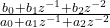
In order to efficiently and flexibly calculate the response we want to implement it in a second order IIR (infinite impulse response) filter structure. This structure is basically a representation of  G_z as a rational function

 \frac{ b_0 + b_1 z^{-1} + b_2 z^{-2} }{ a_0 + a_1 z^{-1} + a_2 z^{-2} }

so we need to take the expression apart such that we can determine the coefficients a_1, a_2, b_0, … (by convention, the problem is scaled such that a_0 = 1.

This is all very cumbersome to do manually (and I suck at doing this, especially as I insert quite embarrassing mistakes all the time). So, sympy to the rescue:

import sympy as sy

Kp, Ki, Ts = sy.symbols("K_p K_i T_s", real=True)
z = sy.symbols("z", complex=True)
G_z = Kp + Ki*Ts/2 + (Ki*Ts/2 - Kp)/z

display(G_z)

n, d = G_z.ratsimp().as_numer_denom()
n, d = n.as_poly(z), d.as_poly(z)

display(n, d)

We first define the symbols needed. Then set up G_z according to our equation above. After displaying it for good measure, we do a rational simplification ratsimp() on it and split it into numerator n and denominator d.

Now, we represent n and d as polynomials of z. And this is how we obtain our coefficients a1, a2, and so on. We continue:

scale = d.LC()

n, d = (n.as_expr()/scale).as_poly(z), (d.as_expr()/scale).as_poly(z)
N, D = n.degree(), d.degree()

We find the scaling factor as the leading coefficient (LC()) of the denominator d, scale both accordingly and determine the degree of each (this is mostly to determine for how many terms we have to iterate when printing etc.).

Bs = n.all_coeffs()
As = d.all_coeffs()

display(Bs)
display(As)

Now, basically Bs contains all coefficients [b0 b1] and likewise for As. Here’s a shortcut, see if you can spot it.

And now comes the cse magic:

commons, exprs = sy.cse(Bs)

This returns a tuple. The first element is a list of tuples of arbitrarily assigned place holder variables x0, x1, and so on. The second element are the original expressions, but the placeholders are substituted. In this example:

(
  [
    (x0, K_i*T_s/2)
  ],
  [K_p + x0, -K_p + x0]
)

Which means, instead of calculating K_i*T_s/2 twice, we can do it once, assign it to x0 and use that on the expressions.

You can even concatenate As and Bs for good measure (not really necessary here, since the As only contain 1 and 0, but in other controller topologies this may change).

commons, exprs = sy.cse(As + Bs)

# Printing C code for instance
for com in commons:
    print( sy.ccode(com[1], assign_to=repr(com[0])) )

for expr, name in zip(exprs, "a0 a1 b0 b1".split(" ")):
    print( sy.ccode(expr, assign_to=f"coeffs.{name:s}") )

We obtain the common terms commons and the reduced expressions exprs, then print the common terms assigning them to their respective placeholder variables, and finally print the reduced expressions. This produces this five liner in C:

x0 = (1.0/2.0)*K_i*T_s;
coeffs.a0 = 1;
coeffs.a1 = 0;
coeffs.b0 = K_p + x0;
coeffs.b1 = -K_p + x0;

Now, how is this useful you ask? Well, for this toy example it certainly is a lot of work for five lines I could’ve just typed out.

But if you go into a PID controller with damped differential term, and you want your code to be efficient (i.e. have as few operations as possible), this is very handy. Just by changing the symbols and the expression for G_z we obtain this:

x0 = 2*T_v;
x1 = 1.0/(T_s + x0);
x2 = 4*T_v;
x3 = T_i*T_s;
x4 = 2*x3;
x5 = T_i*x2;
x6 = 1.0/(x4 + x5);
x7 = K_p*x4;
x8 = K_p*T_s*x0;
x9 = pow(T_s, 2);
x10 = 4*K_p*T_d*T_i + K_p*x5;
x11 = K_p*x9 + x10;
c.a0 = 1;
c.a1 = -x1*x2;
c.a2 = x1*(-T_s + 2*T_v);
c.b0 = x6*(x11 + x7 + x8);
c.b1 = (K_p*x9 - x10)/(T_i*x0 + x3);
c.b2 = x6*(x11 - x7 - x8);

I did this manually once, and only obtained five or six of the placeholders. That’s the power of cse().

Oh, you need the code in Python for testing? No problem, just use pycode instead (and work around that assign_to parameter).

So, there you have it.

Categories
Embedded Engineering Linux Python

Red Pitaya using only pyVISA

The Red Pitaya boards offer an SCPI server over an TCP/IP Socket connection. The makers describe how to use it. But instead of using plain pyVISA, they provide their own SCPI class.

That’s fine, because that class also provides handy functions to set the various in-built applications (signal generator and the likes).

But it is unnecessary complicated for a blinky example. And in my case, where I only needed some scriptable DIOs, it was quite cumbersome.

So, here is the blinky re-written in plain pyVISA:

import pyvisa as visa
from time import sleep

rm = visa.ResourceManager()
rp = rm.open_resource("TCPIP::169.254.XXX.XXX::5000::SOCKET",
                 read_termination="\r\n",
                 write_termination="\r\n"
                 )

print(rp.query("*IDN?"))

while True:
    rp.write("DIG:PIN LED0,1")
    sleep(.5)
    rp.write("DIG:PIN LED0,0")
    sleep(.5)

The magic lies in the read and write terminations. They have to be set to '\r\n'(in that order), or else the communication simply won’t work and time out.

Make sure you install a reasonably recent pyVISA and pyVISA-py (from pip) or libvisa (from your distro’s repository) before you start. For me (Ubuntu) this works as follows:

pip install -U pyvisa pyvisa-py
sudo apt install libvisa

This integrates nicely with existing instrument command structures and allows for quick testing.

Categories
Arduino Embedded Hardware

Arduino* and a custom board

At work a colleague developed a custom board in the time of chip shortage™ and had to use a 20 MHz oscillator in place of a 16 MHz requiring a custom board configuration. The solution after searching the often misleading Arduino forums was to hack it into the global platform.txt.

This is neither portable nor does it interact well with updates of the Core. Fortunately, there are very good, not misleading forum posts!

A (hopefully more than just slightly) better solution is to use the hardware/ directory in the Sketchbook folder and to reference the standard Arduino configurations (using the VENDOR_ID:VARIANT_ID notation).

  • Let’s name the board gsino since my colleague and I work at GSI.
  • Then let’s create a folder structure $SKETCHBOOK/hardware/gsi/avr and …
  • … write a basic boards.txt shown below:
gsino.name=GSino Board

gsino.upload.tool=arduino:avrdude
gsino.upload.protocol=arduino:arduino
gsino.upload.maximum_size=32256
gsino.upload.maximum_data_size=2048
gsino.upload.speed=144000

gsino.bootloader.tool=arduino:avrdude

gsino.build.mcu=atmega328p
gsino.build.f_cpu=20000000L
gsino.build.board=AVR_UNO
gsino.build.core=arduino:arduino
gsino.build.variant=arduino:standard

If the created folder contains only this board.txt file, the menu entry in the IDE for this board will be “Tools/Board/gsi-avr/GSino Board”. If you want it a little prettier, create a platform.txt with

gsino.name=GSino
gsino.version=1.0.0

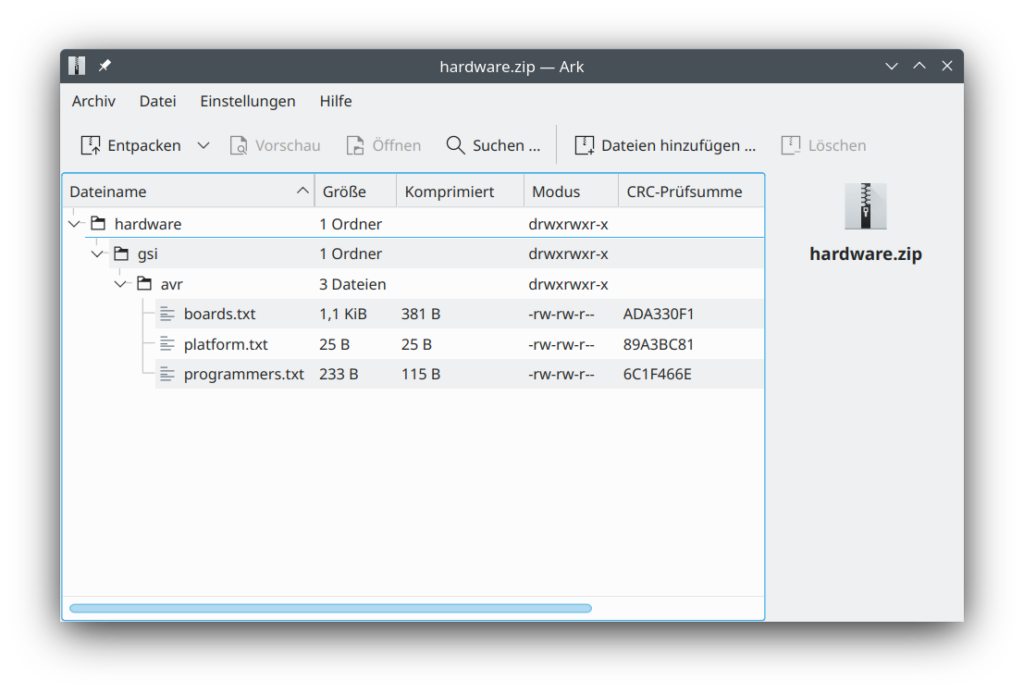
Voilà! If you need to take this to another computer or share it with a friend, just zip the relevant parts of the $SKETCHBOOK/hardware/ folder and unpack it in its new location.

Screenshot of the archive showing the folder hierarchy: "hardware/gsi/avr/" with the three relevant files "boards.txt", "platform.txt" and "programmers.txt".

And there you have a slightly more portable and cleaner solution to writing your own hardware platform.

*) This was done on Arduino IDE version 1.8.19 and should work for quite a while (probably after version 1.5.x). AFAIK, this should work similarly with the new 2.0 IDE. But I did not test this.

Categories
FPGA VHDL

Interesting details of ieee.fixed_pkg

Today I learned that in order to assign a negative sfixed (signed fixed-point) signal or variable to another signal or variable, I have to use resize.

process
    variable x0: sfixed(7 downto -8) := to_sfixed(1, 7, -8);
    constant val: sfixed(7 downto -8) := to_sfixed(10, 7, -8);
begin
    -- does not work:
    x0 := -val;
    
    -- this does work:
    x0 := resize(-val, x0);
end process;

So, it seems, internally this is an actual multiplication and not a manipulation on the signed value.

This holds for GHDL 3.0 using the VHDL-2008 standard. No idea yet what other tools do with this.

Categories
Uncategorized

I ditched Twitter…

… for all the obvious reasons.

Since then, I have noticed that I had addictive behavioural patterns. Given the relative smallness (is that a word) of the Fediverse, I hope I will do more sensible stuff with my time.

I had noticed this before, when I ditched Facebook. So, bottom line: “social media” isn’t good for me.